butterfly主题添加音乐页面(适配手机)

前言

没有音乐页面怎么行,花里胡哨的都安排上,本来想摆烂直接上aplayer,但考虑到我不会写样式(虽然我可以自学) 所以我音乐页面用的是 Chuckle的方案

(等会为啥开头这么像 https://www.chuckle.top/article/3322c8a8.html

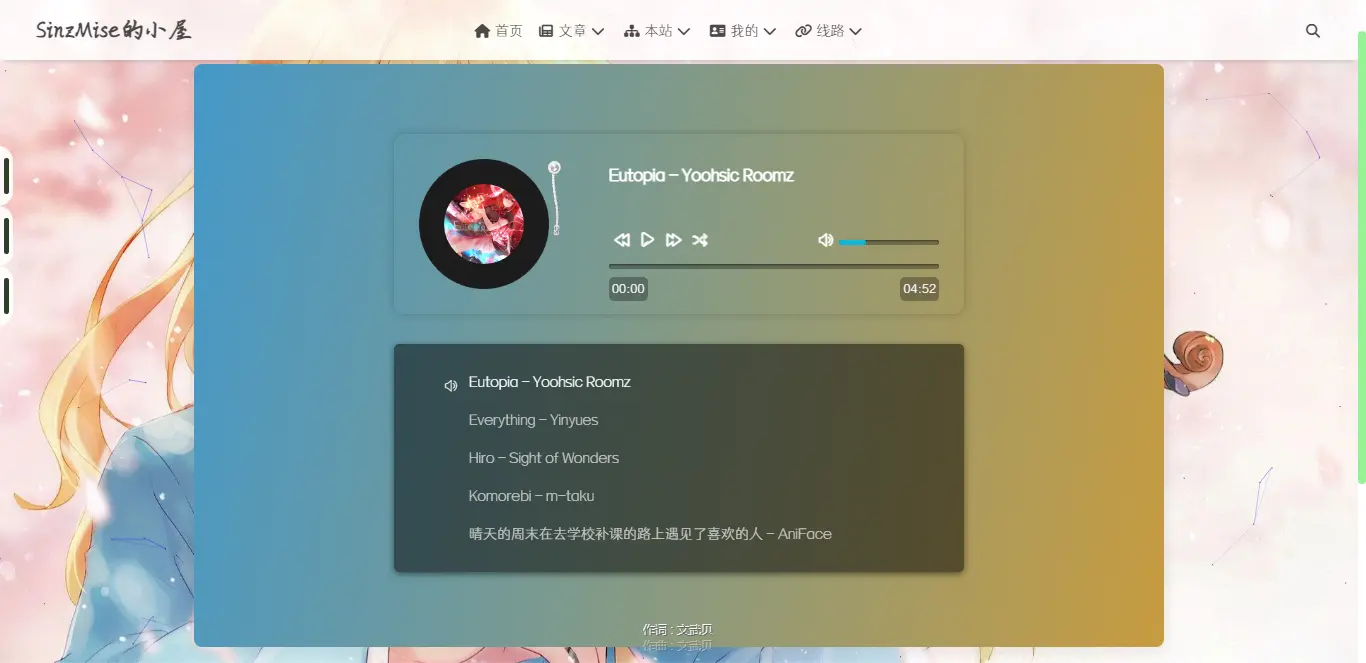
原本我是想做 单页背景透明的,但我发现单页背景透明和我博客背景冲突导致丑的一批,所以我把背景换成了渐变动画
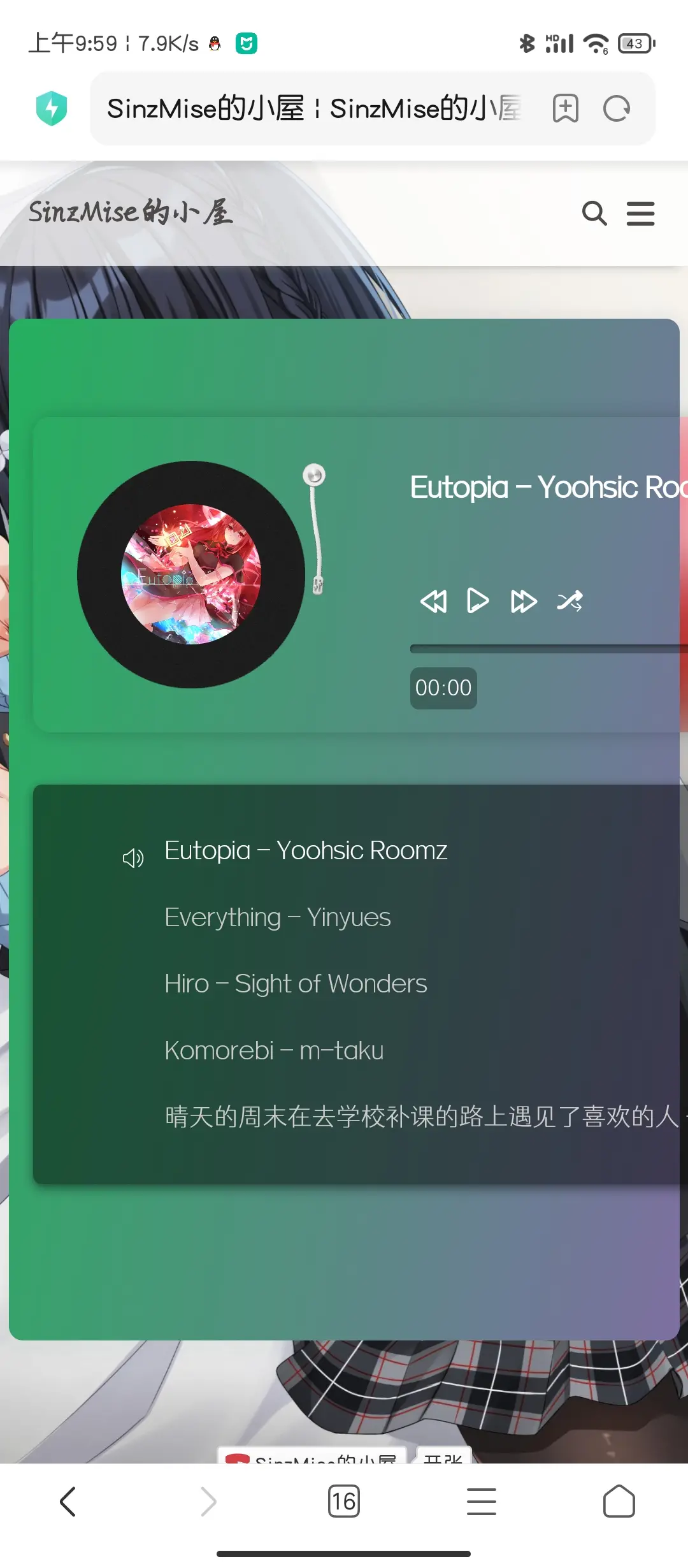
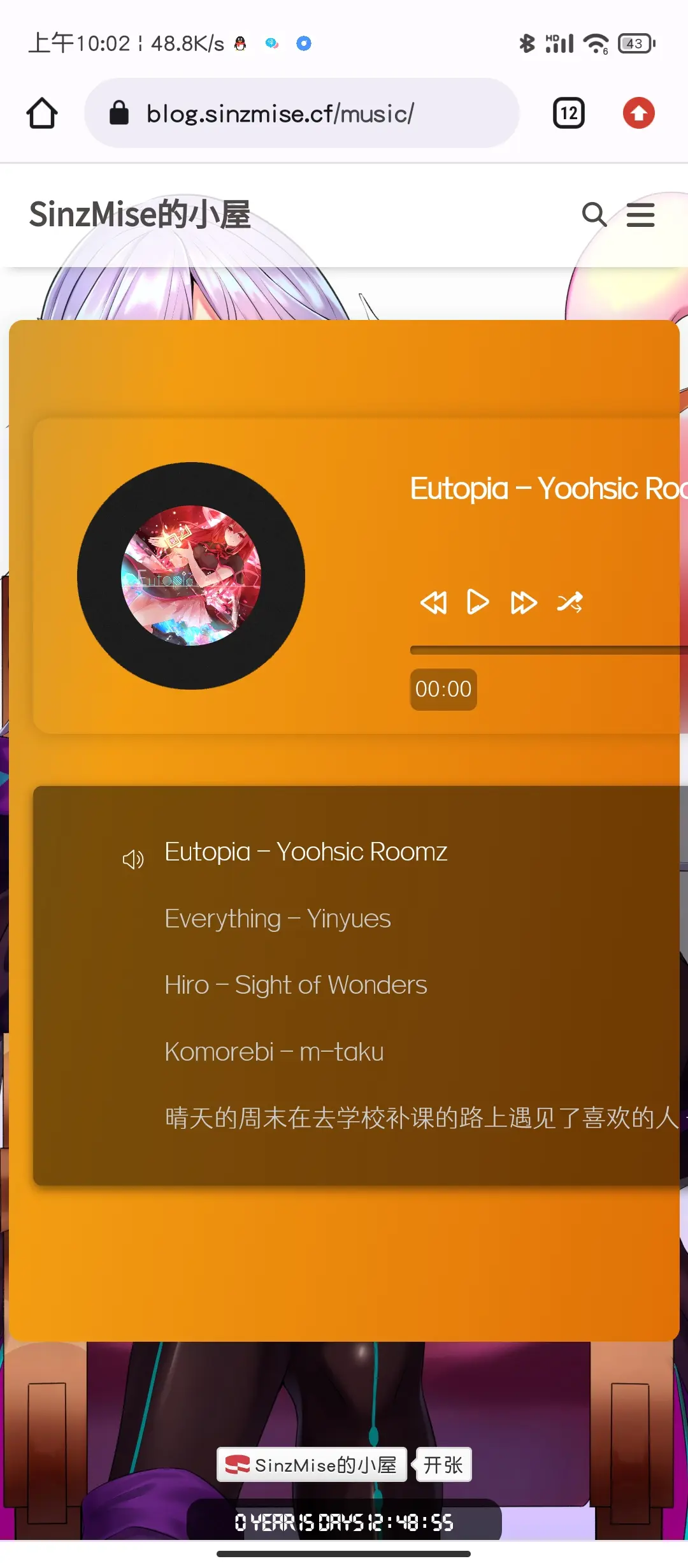
以下是我之前的音乐页面: msedge_x1MaJIbBQg 别问为啥是之前,这个音乐页面手机访问是这样的: Screenshot_2023-01-09-09-59-57-499_com 当时我还以为是浏览器的问题,立即换成了Chrome浏览器,结果: Screenshot_2023-01-09-10-02-41-554_com (后来我用手机访问了那位大佬的音乐页面,也是一样出现这个问题,之前有人反映过这位大佬,大佬说自己去适配,但我懒得适配,于是就有了这个教程
教程

这个教程是我基于 https://www.php.cn/xiazai/js/6169 做的适配butterfly主题的版本
但后面我发现这跟csdn里的 https://blog.csdn.net/weixin_43151418/article/details/125351391 一模一样
(希望csdn那篇文章的作者看完不会在意)
  1. 新建[Blogroot]\themes\butterfly\layout\includes\page\music.pug,内容如下:
COPY
link(rel='stylesheet' href='/css/musics.css')
.player
  .player__header
    .player__img.player__img--absolute.slider
      button.player__button.player__button--absolute--nw.playlist
        img(src='/svg/playlist.svg', alt='playlist-icon')
      button.player__button.player__button--absolute--center.play
        img(src='/svg/play.svg', alt='play-icon')
        img(src='/svg/pause.svg', alt='pause-icon')
      .slider__content
        each item in theme.musicplayer.musics
          img.img.slider__img(src=item.image, alt='cover')
    .player__controls
      button.player__button.back
        img.img(src='/svg/back.svg', alt='back-icon')
      p.player__context.slider__context
        strong.slider__title
        span.slider__name.player__title
      button.player__button.next
        img.img(src='/svg/next.svg', alt='next-icon')
      .progres
        .progres__filled
  ul.player__playlist.list
    each musics in theme.musicplayer.musics
      li.player__song
        img.player__img.img(src=musics.image, alt='cover')
        p.player__context
          b.player__song-name=musics.name
          span.flex
            span.player__title=musics.author
            span.player__song-time
        audio.audio(src=musics.url)
if theme.musicplayer.hitokoto
  p#hitokoto
    a#hitokoto_text(href="#",target="_blank") :D 获取中...
script(src='/js/player.js')
if theme.musicplayer.hitokoto
  script.
    fetch('https://v1.hitokoto.cn')
      .then(response => response.json())
      .then(data => {
        const hitokoto = document.querySelector('#hitokoto_text')
        hitokoto.href = `https://hitokoto.cn/?uuid=${data.uuid}`
        hitokoto.innerText = data.hitokoto + " —— " + data.creator + "「" + data.from + "」"
      })
      .catch(console.error)
  1. 在[blogroot]\themes\butterfly\source\css\目录下新建musics.css,内容如下:
COPY
  1
  2
  3
  4
  5
  6
  7
  8
  9
 10
 11
 12
 13
 14
 15
 16
 17
 18
 19
 20
 21
 22
 23
 24
 25
 26
 27
 28
 29
 30
 31
 32
 33
 34
 35
 36
 37
 38
 39
 40
 41
 42
 43
 44
 45
 46
 47
 48
 49
 50
 51
 52
 53
 54
 55
 56
 57
 58
 59
 60
 61
 62
 63
 64
 65
 66
 67
 68
 69
 70
 71
 72
 73
 74
 75
 76
 77
 78
 79
 80
 81
 82
 83
 84
 85
 86
 87
 88
 89
 90
 91
 92
 93
 94
 95
 96
 97
 98
 99
100
101
102
103
104
105
106
107
108
109
110
111
112
113
114
115
116
117
118
119
120
121
122
123
124
125
126
127
128
129
130
131
132
133
134
135
136
137
138
139
140
141
142
143
144
145
146
147
148
149
150
151
152
153
154
155
156
157
158
159
160
161
162
163
164
165
166
167
168
169
170
171
172
173
174
175
176
177
178
179
180
181
182
183
184
185
186
187
188
189
190
191
192
193
194
195
196
197
198
199
200
201
202
203
204
205
206
207
208
209
210
211
212
213
214
215
216
217
218
219
220
221
222
223
224
225
226
227
228
229
230
231
232
233
234
235
236
237
238
239
240
241
242
243
244
245
246
247
248
249
250
251
252
253
254
255
256
257
258
259
260
261
262
263
264
265
266
267
268
269
270
271
272
273
274
275
276
277
278
279
280
281
282
283
284
285
286
287
288
289
290
291
292
293
294
295
296
297
298
299
300
301
302
303
304
305
306
307
308
309
310
311
312
313
314
315
316
317
318
319
320
321
322
323
324
325
326
327
328
329
330
331
332
333
334
335
336
337
338
339
340
341
342
343
344
345
346
347
348
349
350
351
352
353
354
355
356
357
358
359
360
361
362
363
364
365
366
367
368
369
370
371
372
373
374
375
376
377
378
379
380
381
382
::root {
    --parent-height : 20em ;
    --duration: 1s ;
    --duration-text-wrap: 12s 1.5s cubic-bezier(0.82, 0.82, 1, 1.01) ;
    --cubic-header: var(--duration) cubic-bezier(0.71, 0.21, 0.3, 0.95) ;
    --cubic-slider : var(--duration) cubic-bezier(0.4, 0, 0.2, 1) ;
    --cubic-play-list : .35s var(--duration) cubic-bezier(0, 0.85, 0.11, 1.64) ;
    --cubic-slider-context : cubic-bezier(1, -0.01, 1, 1.01) ; 
}
.img {
    width: 100% ;
    display: block ;
    object-fit: cover ;
}
.list {
    margin: 0 ;
    padding: 0 ;
    list-style-type: none ;
}

.flex {

    display: flex ;
    align-items: center ;
    justify-content: space-between ;

}

.uppercase{
  
    text-transform: uppercase ;
  
}

.player {

    width: 17.15em ;
    display: flex ;
    overflow: hidden ;
    font-size: 1.22em ;
    border-radius: 1.35em ;
    flex-direction: column ;
    background-color: white ;
    height: var(--parent-height) ;
    margin:0 auto ;

}

.player__header {

    z-index: 1 ;
    gap: 0 .4em ;
    width: 100% ;
    display: flex;
    height: 5.85em ;
    flex-shrink: 0 ;
    position: relative;
    align-items: flex-start ;
    border-radius: inherit ;
    justify-content: flex-end ;
    background-color: white  ;
    padding: .95em 0.6em 0 1.2em ;
    box-shadow: 0 2px 6px 1px #0000001f ;
    transition: height var(--cubic-header), box-shadow var(--duration), padding var(--duration) ease-in-out ;

}

.player__header.open-header {

    height: 100% ;
    padding-left: 0 ;
    padding-right: 0 ;
    box-shadow: unset ;

}

.player__img {

    width: 3.2em ;
    height: 3.2em ;
    border-radius: 1.32em ;

}

.player__img--absolute {
  
    top: 1.4em ;
    left: 1.2em ;
    position: absolute ;
    
}

.slider {

    flex-shrink: 0 ;
    overflow: hidden ;
    transition: width var(--cubic-header), height var(--cubic-header), top var(--cubic-header), left var(--cubic-header);
    
}

.slider.open-slider{

    top: 0 ;
    left: 0 ;
    width: 100% ;
    height: 14.6em ;

}

.slider__content {

    display: flex ;
    height: 100% ;
    transition: transform var(--cubic-slider);

}

.slider__img {

    filter: brightness(75%) ;

}

.slider__name, 
.slider__title {
  
    overflow: hidden ;
    white-space: nowrap ;

}

.text-wrap {

    display: block ;
    white-space: pre ;
    width: fit-content ;
    animation: text-wrap var(--duration-text-wrap) infinite ;

}

@keyframes text-wrap {

    75%{
      
        transform: translate3d(-51.5%, 0, 0) ;
      
    }

    100%{
      
        transform: translate3d(-51.5%, 0, 0) ;

    }
    
}

.player__button {

    all: unset ;
    z-index: 100 ;
    width: 2.5em ;
    height: 2.5em ;
    cursor: pointer ;

}

.playlist {

    transform: scale(0) ;
    transition: transform calc(var(--duration) / 2) ;
    
}

.slider.open-slider .playlist {

    transform: scale(1) ;
    transition: transform var(--cubic-play-list) ;


}

.player__button--absolute--nw {

    top: 5.5% ;
    left: 5.5% ;
    position: absolute ;
    
}

.player__button--absolute--center {
    
    top: 0 ;
    left: 0 ;
    right: 0 ;
    bottom: 0 ;
    margin: auto ;
    position: absolute ;

}

img[alt ="pause-icon"] {

    display: none ;
    
}

.player__controls {

    width: 77% ;
    gap: .5em 0 ;
    display: flex ;
    flex-wrap: wrap ;
    align-items: center ;
    will-change: contents ;
    align-content: center ;
    justify-content: center ;
    transition: transform var(--cubic-header) , width var(--cubic-header) ;

}

.player__controls.move {

    width: 88% ;
    transform: translate3d(-1.1em , calc(var(--parent-height) - 153%) , 0) ;
    
}

.player__context {

    margin: 0 ;
    width: 100% ;
    display: flex ;
    line-height: 1.8 ;
    flex-direction: column ;
    justify-content: center ;
    text-transform: capitalize ;

}

.slider__context {

    width: 56.28% ;
    cursor: pointer ;
    text-align: center ;
    padding-bottom: .2em ;
    will-change: contents ;
    transition: width var(--cubic-header) ;
    animation: calc(var(--duration) / 2) var(--cubic-slider-context) ;

}

@keyframes opacity {
   

    0% {

        opacity: 0 ;

    }

    90%{

        opacity: 1 ;

    }

}

.player__controls.move .slider__context{
    
    width: 49.48% ;

}

.player__title {

    font-size: .7em ;
    font-weight: bold ;
    color: #00000086 ;

}

.progres {

    width: 90% ;
    height: .25em ;
    cursor: pointer ;
    border-radius: 1em ;
    background-color: #e5e7ea ;
    transition: width var(--cubic-header) ;

}

.player__controls.move .progres{

    width: 98% ;
    
}

.progres__filled {

    width: 0% ;
    height: 100% ;
    display: flex ;
    position: relative ;
    align-items: center ;
    border-radius: inherit ;
    background-color: #78adfe ;
    
}

.progres__filled::before {

    right: 0 ;
    width: .35em ;
    content: " " ;
    height: .35em ;
    border-radius: 50% ;
    position: absolute ;
    background-color: #5781bd ;
    
}

.player__playlist {

    height: 100% ;
    overflow: auto ;   
    padding: 1.05em .9em 0 1.2em ; 

}

.player__playlist::-webkit-scrollbar {
    
    width: 0 ;

}

.player__song {

/*     gap: 0 .65em ; */
    display: flex ;
    cursor: pointer ;
    margin-bottom: .5em ;
    padding-bottom: .7em ;
    border-bottom: .1em solid #d8d8d859 ;

}

.player__song .player__context {

    line-height: 1.5 ;
    margin-left: .65em ;

}

.player__song-name {

    font-size: .88em ;

}

.player__song-time {

    font-size: .65em ;
    font-weight: bold ;
    color: #00000079 ; 
    height: fit-content ;
    align-self: flex-end ;

}

.audio {

    display: none !important ;

}
.player__song-name,.slider__title{
    color:#000
}
#hitokoto{
    text-align: center;
}
  1. 在[blogroot]\themes\butterfly\source\js\目录下新建player.js,内容如下:
COPY
  1
  2
  3
  4
  5
  6
  7
  8
  9
 10
 11
 12
 13
 14
 15
 16
 17
 18
 19
 20
 21
 22
 23
 24
 25
 26
 27
 28
 29
 30
 31
 32
 33
 34
 35
 36
 37
 38
 39
 40
 41
 42
 43
 44
 45
 46
 47
 48
 49
 50
 51
 52
 53
 54
 55
 56
 57
 58
 59
 60
 61
 62
 63
 64
 65
 66
 67
 68
 69
 70
 71
 72
 73
 74
 75
 76
 77
 78
 79
 80
 81
 82
 83
 84
 85
 86
 87
 88
 89
 90
 91
 92
 93
 94
 95
 96
 97
 98
 99
100
101
102
103
104
105
106
107
108
109
110
111
112
113
114
115
116
117
118
119
120
121
122
123
124
125
126
127
128
129
130
131
132
133
134
135
136
137
138
139
140
141
142
143
144
145
146
147
148
149
150
151
152
153
154
155
156
157
158
159
160
161
162
163
164
165
166
167
168
169
170
171
172
173
174
175
176
177
178
179
180
181
182
183
184
185
186
187
188
189
190
191
192
193
194
195
196
197
198
199
200
201
202
203
204
205
206
207
208
209
210
211
212
213
214
215
216
217
218
219
220
221
222
223
224
225
226
227
228
229
230
231
232
233
234
// Designed by:  Mauricio Bucardo
// Original image: https://dribbble.com/shots/6957353-Music-Player-Widget

"use strict";


// add elemnts
const bgBody = ["#e5e7e9", "#ff4545", "#f8ded3", "#ffc382", "#f5eda6", "#ffcbdc", "#dcf3f3"];
const body = document.body;
const player = document.querySelector(".player");
const playerHeader = player.querySelector(".player__header");
const playerControls = player.querySelector(".player__controls");
const playerPlayList = player.querySelectorAll(".player__song");
const playerSongs = player.querySelectorAll(".audio");
const playButton = player.querySelector(".play");
const nextButton = player.querySelector(".next");
const backButton = player.querySelector(".back");
const playlistButton = player.querySelector(".playlist");
const slider = player.querySelector(".slider");
const sliderContext = player.querySelector(".slider__context");
const sliderName = sliderContext.querySelector(".slider__name");
const sliderTitle = sliderContext.querySelector(".slider__title");
const sliderContent = slider.querySelector(".slider__content");
const sliderContentLength = playerPlayList.length - 1;
const sliderWidth = 100;
let left = 0;
let count = 0;
let song = playerSongs[count];
let isPlay = false;
const pauseIcon = playButton.querySelector("img[alt = 'pause-icon']");
const playIcon = playButton.querySelector("img[alt = 'play-icon']");
const progres = player.querySelector(".progres");
const progresFilled = progres.querySelector(".progres__filled");
let isMove = false;

// creat functions
function openPlayer() {

    playerHeader.classList.add("open-header");
    playerControls.classList.add("move");
    slider.classList.add("open-slider");
    
}

function closePlayer() {

    playerHeader.classList.remove("open-header");
    playerControls.classList.remove("move");
    slider.classList.remove("open-slider");
    
}

function next() {
    
    if (count == sliderContentLength) {
        count = count;
        return
    }
    
    left += sliderWidth;
    left = Math.min(left, (sliderContentLength) * sliderWidth);
    sliderContent.style.transform = `translate3d(-${left}%, 0, 0)`;
    count++;

    changeSliderContext();
    changeBgBody();
    selectSong();

}

function back() {
    
    if (count == 0) {
        count = count
        return
    }
    
    left -= sliderWidth;
    left = Math.max(0, left);
    sliderContent.style.transform = `translate3d(-${left}%, 0, 0)`;
    count--;

}

function changeSliderContext() {

    sliderContext.style.animationName = "opacity";
    
    sliderName.textContent = playerPlayList[count].querySelector(".player__title").textContent;
    sliderTitle.textContent = playerPlayList[count].querySelector(".player__song-name").textContent;
    
    if (sliderName.textContent.length > 16) {
        const textWrap = document.createElement("span");
        textWrap.className = "text-wrap";
        textWrap.innerHTML = sliderName.textContent + "   " + sliderName.textContent;  
        sliderName.innerHTML = "";
        sliderName.append(textWrap);
        
    }

    if (sliderTitle.textContent.length >= 18) {
        const textWrap = document.createElement("span");
        textWrap.className = "text-wrap";
        textWrap.innerHTML = sliderTitle.textContent + "    " + sliderTitle.textContent;  
        sliderTitle.innerHTML = "";
        sliderTitle.append(textWrap);
    }

}

function changeBgBody() {
    body.style.backgroundColor = bgBody[count];
}

function selectSong() {

    song = playerSongs[count];

    for (const item of playerSongs) {

        if (item != song) {
            item.pause();
            item.currentTime = 0;
        }

    }

    if (isPlay) song.play();
    
    
}

function playSong() {


    if (song.paused) {
        song.play();
        playIcon.style.display = "none";
        pauseIcon.style.display = "block";

    }else{
        song.pause();
        isPlay = false;
        playIcon.style.display = "";
        pauseIcon.style.display = "";
    }


}

function progresUpdate() {

    const progresFilledWidth = (this.currentTime / this.duration) * 100 + "%";
    progresFilled.style.width = progresFilledWidth;

    if (this.duration == this.currentTime) {
        next();
    }
    if (count == sliderContentLength && song.currentTime == song.duration) {
        playIcon.style.display = "block";
        pauseIcon.style.display = "";
        isPlay = false;
    }
}

function scurb(e) {

    // If we use e.offsetX, we have trouble setting the song time, when the mousemove is running
    const currentTime = ( (e.clientX - progres.getBoundingClientRect().left) / progres.offsetWidth ) * song.duration;
    song.currentTime = currentTime;

}

function durationSongs() {

    let min = parseInt(this.duration / 60);
    if (min < 10) min = "0" + min;

    let sec = parseInt(this.duration % 60);
    if (sec < 10) sec = "0" + sec;
    
    const playerSongTime = `${min}:${sec}`;
    this.closest(".player__song").querySelector(".player__song-time").append(playerSongTime);

}


changeSliderContext();

// add events
sliderContext.addEventListener("click", openPlayer);
sliderContext.addEventListener("animationend", () => sliderContext.style.animationName ='');
playlistButton.addEventListener("click", closePlayer);

nextButton.addEventListener("click", next);

backButton.addEventListener("click", () => {
    back();
    changeSliderContext();
    changeBgBody();
    selectSong();

});

playButton.addEventListener("click", () => {
    isPlay = true;
    playSong();
});

playerSongs.forEach(song => {
    song.addEventListener("loadeddata" , durationSongs);
    song.addEventListener("timeupdate" , progresUpdate);
    
});

progres.addEventListener("mousedown", (e) => {
    scurb(e);
    isMove = true;
    song.muted = true;
});

document.addEventListener("mousemove", (e) => isMove && scurb(e));

document.addEventListener("mouseup", () => {
    isMove = false
    song.muted = false;
});

document.ondragstart = () => {
  return false
};
  1. 编辑[blogroot]\themes\butterfly\layout\page.pug
COPY
 1
 2
 3
 4
 5
 6
 7
 8
 9
10
11
12
13
    case page.type
      when 'tags'
        include includes/page/tags.pug
      when 'link'
        include includes/page/flink.pug
      when 'bb'
        include includes/page/bb.pug
      when 'categories'
        include includes/page/categories.pug
+      when 'music'
+        include includes/page/music.pug
      default
        include includes/page/default-page.pug
  1. 编辑[blogroot]\themes\butterfly_config.yml,在末尾添加:
COPY
 1
 2
 3
 4
 5
 6
 7
 8
 9
10
11
12
13
14
15
musicplayer:
  hitokoto: true # 一言
  musics:
    - name: 'Eutopia'
      author: 'Yoohsic Roomz'
      image: 'http://p2.music.126.net/2VW7YM7You-iOyl4_smA0Q==/109951165875618375.jpg'
      url: 'http://music.163.com/song/media/outer/url?id=29129889.mp3'
    - name: 'Everything'
      author: 'Yinyues'
      image: 'http://p2.music.126.net/TcxdEdzRbKrwli4fVGeSiw==/6628955604788949.jpg'
      url: 'http://music.163.com/song/media/outer/url?id=29544794.mp3'
#    - name: '歌曲名字'
#      author: '歌曲作者'
#      image: '歌曲图片'
#      url: '歌曲链接'
  1. 将svg.7z压缩包里的五个文件放在[blogroot]\themes\butterfly\source\svg 里面 https://sinz.lanzouw.com/iFMmG0kjkuvg (密码:gt97)
  2. 运行hexo new page music
  3. 编辑[blogroot]\source\music\index.md,把里面的内容替换成:
COPY
1
2
3
4
5
---
type: 'music'
comments: false
aside: false
---
  1. 新建[Blogroot]\themes\butterfly\layout\includes\page\music.pug(有搞1.0的话直接把music.pug里面的内容全都替换成下面的内容),内容如下:
COPY
link(
  href="/assets/css/tplayer.css"
  rel="stylesheet"
  type="text/css"
)
link(
  href="/assets/plugins/FontAwesome4.1/css/font-awesome.min.css"
  rel="stylesheet"
  type="text/css"
)
script(src="/assets/js/jquery.js")
script(src="/assets/js/jquery-ui.js")
script(src="/assets/js/tPlayer.js")
#t_wrapper
  #t_cover
    img(src="/assets/images/logo.png")
  #t_top
    #t_title_info
      span.artist
      span.title
  #t_middle
    #play
    #pause.hidden
    #t_progress.ui-corner-all.ui-slider.ui-slider-horizontal.ui-widget.ui-widget-content
      #trackInfo
        #error
        #current 0:00
        #duration 0:00
      .ui-corner-all.ui-slider-range.ui-slider-range-min.ui-widget-header(style="width: 0%;")
      span.ui-corner-all.ui-slider-handle.ui-state-default(style="left: 0%;" tabindex="0")
    span#prev
    span#next
  #t_bottom
    #range
      #val
      #vol
      #rangeVal
    #t_pls_show.noselectpls
#playlist
  ul
    each musics in theme.musicplayer.musics
      li(
        t_artist=musics.author
        t_cover=musics.image
        t_name=musics.name
      )
        a(href="#")=musics.name + ' - ' + musics.author
        audio(preload="none" src=musics.url type="audio/mp3")
if theme.musicplayer.hitokoto
  p#hitokoto
    a#hitokoto_text(href="#",target="_blank",style="text-align:center;color: #fff;") :D 获取中...
if theme.musicplayer.hitokoto
  script.
    fetch('https://v1.hitokoto.cn')
      .then(response => response.json())
      .then(data => {
        const hitokoto = document.querySelector('#hitokoto_text')
        hitokoto.href = `https://hitokoto.cn/?uuid=${data.uuid}`
        hitokoto.innerText = data.hitokoto + " —— " + data.creator + "「" + data.from + "」"
      })
      .catch(console.error)
  1. 将下面压缩包内五个文件夹全都解压在[blogroot]\themes\butterfly\source\assets 文件夹里面 https://sinz.lanzouw.com/iUJTx0krafpi (密码:3r5i)

::: info

1.0想升级成2.0的,下面的步骤可以不用做

:::

  1. 编辑[blogroot]\themes\butterfly_config.yml,在末尾添加:
COPY
 1
 2
 3
 4
 5
 6
 7
 8
 9
10
11
12
13
14
15
musicplayer:
  hitokoto: true # 一言
  musics:
    - name: 'Eutopia'
      author: 'Yoohsic Roomz'
      image: 'http://p2.music.126.net/2VW7YM7You-iOyl4_smA0Q==/109951165875618375.jpg'
      url: 'http://music.163.com/song/media/outer/url?id=29129889.mp3'
    - name: 'Everything'
      author: 'Yinyues'
      image: 'http://p2.music.126.net/TcxdEdzRbKrwli4fVGeSiw==/6628955604788949.jpg'
      url: 'http://music.163.com/song/media/outer/url?id=29544794.mp3'
#    - name: '歌曲名字'
#      author: '歌曲作者'
#      image: '歌曲图片'
#      url: '歌曲链接'
  1. 运行hexo new page music
  2. 编辑[blogroot]\source\music\index.md,把里面的内容替换成:
COPY
1
2
3
4
5
---
type: 'music'
comments: false
aside: false
---
作者: 王九弦SZ·Ninty
文章链接: https://blog.storia.ren/posts/22945/
版权声明: All posts on this blog are licensed under the CC BY-NC-SA 4.0 license unless otherwise stated. Please cite 绘星里 !

评论